📱For Android mobile devices click the blue install button below to install the app.
If the install button doesn’t work for you or you’re not using android, stay on this page (https://seerahadventures.com/install-app/) and follow the steps below for your device.
📱 Open in Chrome to install
If you opened this page from WhatsApp, Instagram, Facebook, or another app, the install button may not work properly.
Please tap the menu and choose Open in browser, then install using Google Chrome or Samsung Internet.
iPhone / iPad (Safari)
⚠️ Important: The app can only be installed using Safari. It will NOT work in Chrome, WhatsApp, or Instagram browsers.
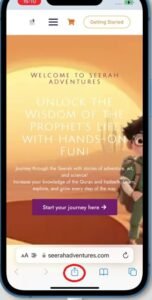
STEP 1: Open this page in Safari 🧭
If you opened this page (https://seerahadventures.com/install-app/) from WhatsApp or another app, tap the Share icon and choose Open in Safari.
STEP 2: Tap the Share button ⬆️
This button looks like a square with an arrow pointing up. You will find it at the bottom of the screen.
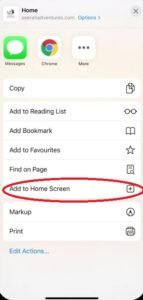
STEP 3: Scroll down and find
➕ Add to Home Screen
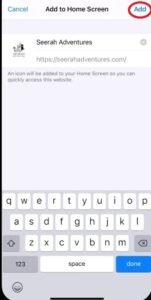
STEP 4: Click Add📱
You will see this in the top-right corner.
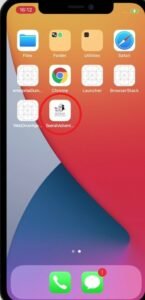
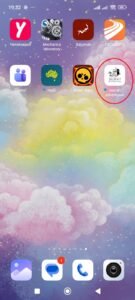
✅ Now the Seerah Adventures icon is on your home screen! Tap it to start your adventure.
📱 Android (Must be Chrome browser or Samsung internet browser)
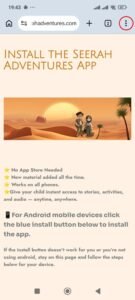
Step 1: Open this page (https://seerahadventures.com/install-app/) in Google Chrome, not from inside WhatsApp or another app.
Step 2: Tap the three dots menu ⋮ at the top right.
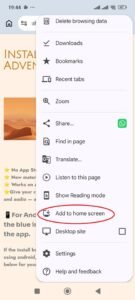
Step 3: Scroll down and Tap ⬇️ Install App or ➕ Add to Home Screen
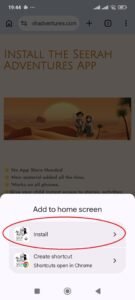
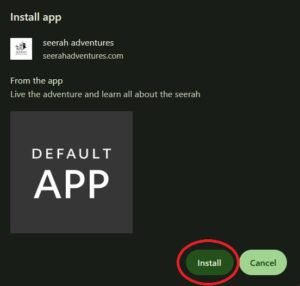
Step 4: Tap Install to confirm.
✅ The app will appear on your home screen ready to open.
💻 Desktop (Chrome / Edge)
Step 1: Open this page (https://seerahadventures.com/install-app/) in Chrome or Edge.
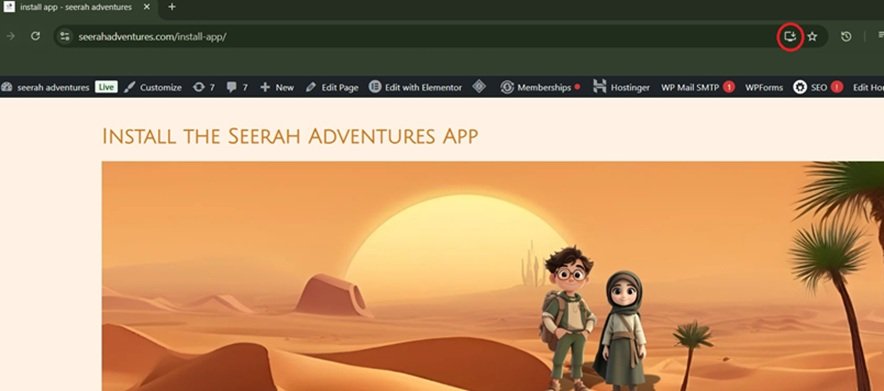
Step 2: Look for the ⬇️ install icon in the address bar.
Step 3: Click Install and follow the prompts.
✅ The app is now installed on your computer’s desktop and ready to launch!